

 View larger preview
Product previews. See the contents and supplied formats below.
For schools & organisations
School Admission Kit
One announcement. A coordinated look.
Prepare your admission announcement for print and social media, then make the details your own.
One-time purchase
Digital download · No physical delivery
- One named school or organisation licence
- PPTX templates · PDF & PNG reference exports
- One ZIP with templates, guide & supporting files


Have a question? Talk to us

One message. Three useful formats.
Keep your school name, admission details and contact information consistent.


Reference exports contain placeholders. Customise the editable templates before printing or posting.
The right files. Ready for your workflow.
Know what you’ll receive and how to use it.
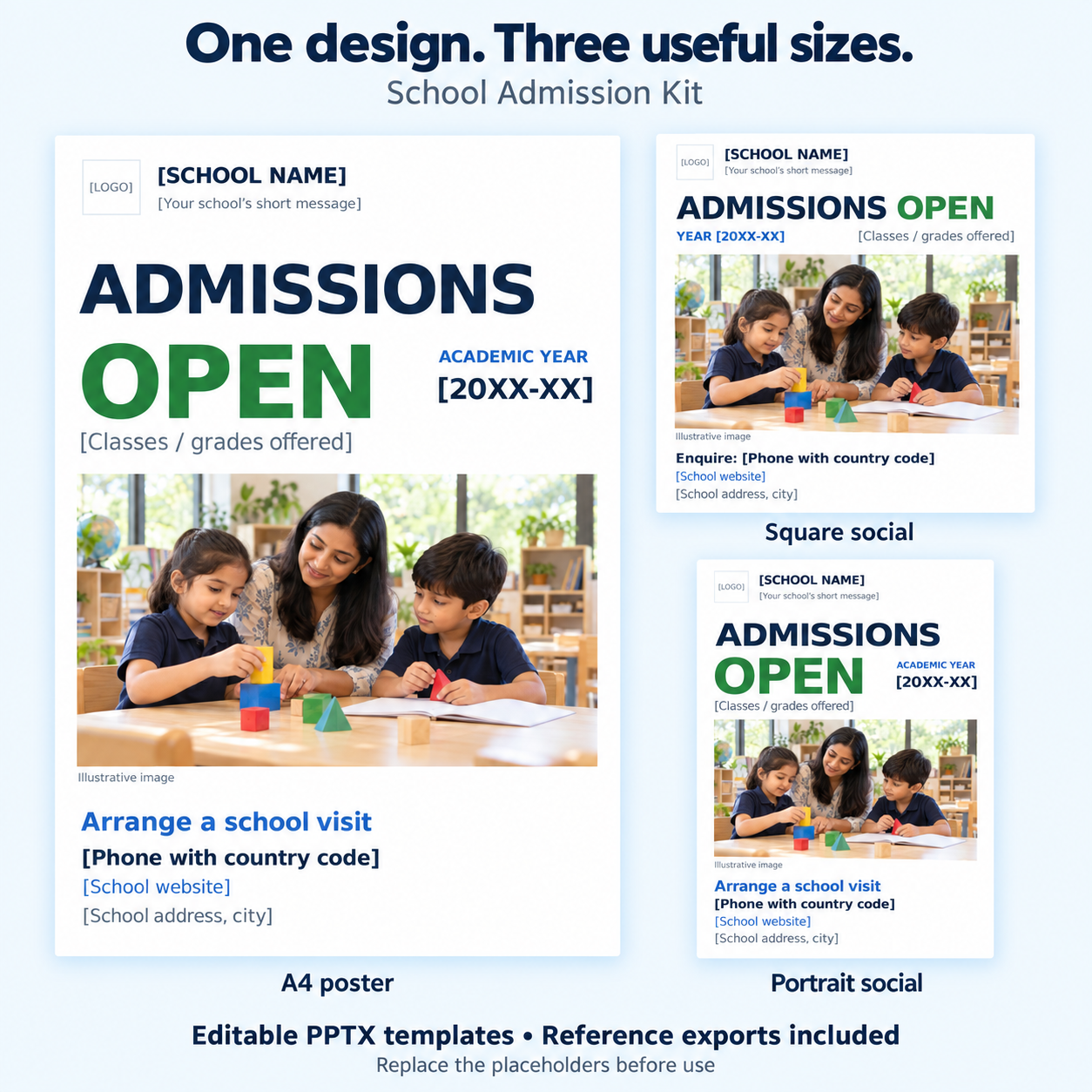
Use software that supports PPTX editing. Reviewed in LibreOffice; native PowerPoint testing is pending. The included classroom image is AI-generated and depicts fictional people.
Full contents, instructions & important details
One announcement, ready for three formats.
Keep the school name, message and contact details consistent across an A4 poster and two social layouts. Each template uses clearly marked placeholders for you to customise.
What's included
- A4 portrait poster: editable PPTX plus a PDF reference export
- Square social layout: editable PPTX plus a 1080 × 1080 PNG reference export
- Portrait social layout: editable PPTX plus a 1080 × 1350 PNG reference export
- Two-page PDF quick-start guide and START-HERE notes
- Included classroom image and DejaVu Sans font files with their font licence
What you can change
Edit the school name, message, admission year, classes, phone number, website and address. Replace the logo placeholder and classroom image with assets you have permission to use.
Prepare your announcement
- Unzip the kit and read the quick-start guide.
- Open the template for the size you need in software that supports PPTX editing.
- Replace every bracketed placeholder and check the contact details.
- Export a PDF or image, then review it before printing or posting.
Before you use it
- The reference exports still contain placeholders. Customise the editable templates before using them for your school.
- The included classroom image is AI-generated and depicts fictional people.
- Layouts have been reviewed in LibreOffice. Microsoft PowerPoint application testing is pending; compatibility with every presentation app is not claimed.
- Custom design, copywriting, individual school editing, printing, advertising and presentation software are not included.
Digital format
One ZIP containing the three templates, reference exports, guide, image, fonts and notes. Product images are representative previews.
After successful payment, the download link is provided on the order confirmation page and by email.
Clear permissions. Confident use.
For your school’s admissions
- Edit and reuse for one named school or organisation.
- Print finished posters and share exported social images.
- Staff and contractors may prepare that school’s materials.
Please keep in mind
- Other schools and separately operated institutions need their own licence.
- Contractors cannot reuse the templates for other clients.
- Custom design, school editing, printing and advertising are not included.
Replace sample content with approved details and assets you have permission to use.
Read the product licenceA few useful answers.
Will I receive a physical product?
No. This product contains digital files. Printing and physical delivery are not included.
Can I edit the files?
Yes. Edit the school name, message, admission year, classes and contact details in the PPTX files. Replace the logo and image with approved assets.
How will I access my download?
After successful payment, follow the download instructions on your order confirmation page and in your order email. If you need help, contact hello@taskpromise.com with your order reference.
What if I have a problem with my files?
Contact hello@taskpromise.com with your order reference and the affected file name. Please read our refund and cancellation policy before ordering.